Case Study

Designing for Disaster Recovery at Scale

Home/Designing for Disaster Recovery at Scale
Role
Experience Design & Secondary Research · High-Fidelity UI & Data Visualisation
Context
Disaster Recovery Operations · 3–4 months · In collaboration with a principal designer and development team
Tools
Figma · FigJam

Hurricane season hits, and entire neighbourhoods are devastated. Homes are destroyed, trees are down, and debris is everywhere. Amidst the chaos, our client — a vital organisation on the front lines of disaster recovery — faces their biggest roadblock: legacy tools.

They have a dedicated team who works tirelessly to clear debris — sorting it, collecting it, and hauling it away. With no technological advancements, their system remained managed via legacy tools, long and prone to error and miscalculations.

Their work involved quite critical timelines and a large number of field workers and backend teams. Already being in a race against time, imagine a crew captain sifting through cumbersome tools for approvals and deployment — or a dispatcher struggling to track debris collection progress.

Our aim was to supercharge the client's response time and efficiency.

THE ECOSYSTEM · FOUR SOLUTIONS, ONE MISSION

Across a timeline of 4–5 months, we worked on the following solutions for the problem statements as part of the same ecosystem.

FOUR PRODUCTS · ONE DISASTER RECOVERY ECOSYSTEM
Debris Management Portal

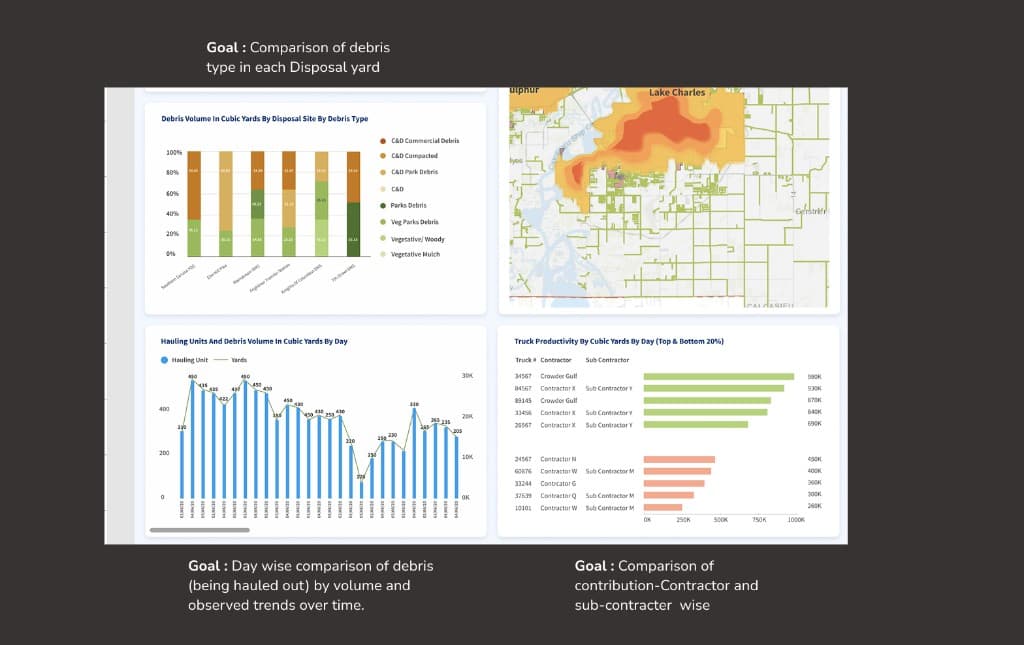
Dashboards tracking debris categories across states via data visualisations and tabulations. Generates reports for all required metrics. Managed by crew captains, heads, and higher authority.

Desktop
Time App

Allows field workers collecting debris to log their time and shifts throughout the day.

Mobile
Case Management

Allows officials to manage fund allocations and track cases of displaced families throughout the recovery process.

Desktop
Disposal Monitor Application

Allows the entire fleet of debris disposal trucks to create entries of debris disposed and associated site details — reflecting in main portal reports.

Mobile

The messy aftermath of natural calamities

The legacy tools supporting this critical operation were the real crisis. Field workers, dispatchers, crew captains, and regional managers all depended on systems that were fragmented, inconsistent, and deeply prone to error.

There was no single source of truth. Data lived in different tools, updated at different cadences, and trusted by nobody. Approvals were delayed. Debris collection progress was invisible. Decisions that should take minutes were taking hours — in a context where hours matter enormously.

The core problem was not an absence of data. It was an absence of clarity, trust, and shared visibility across roles, tools, and locations.

In actuality there were 9 different personas across our interviews. Most of their goals started becoming common while going through the interview data. At a high level, the personas can be categorised as On-field personas and Backend personas.

At a higher level, most personas were looking forward to having: a streamlined platform, all the details in one place, and automation of manual processes.

Eliza Petrowsky
27y · Senior Analyst
Works with: DQS Team Leaders, Regional Data Managers, Invoice Reconciler
  • Automation
  • Improving Productivity
  • Saving time · Cloud Technology
  • Legacy tools · Losing data
  • Poor communication
  • Time-consuming. Needs reports and updates sooner than current tools allow.
  • Ticket and transaction data is scattered — SQL updates needed for simple corrections.
Paul Hernandez
55y · Field Supervisor
Works with: Project Manager, Operation Manager, Debris Monitor
  • Automation
  • Improving Productivity
  • Saving time · Cloud Technology
  • Legacy tools · Losing data
  • Poor communication
  • No system informing supervisors when monitor or employee is out of bounds.
  • Redundant ticket creation with no way to resolve errors end-to-end.
Jolene A. Warner
28y · Invoice Supervisor / Reconciler
Works with: Field Data Staff, Project Managers, Data Supervisors, Contractors
  • Automation · Connected data · Saving time
  • Legacy tools · Load times · Difficulty in usage
  • Using external tools to track invoices — tedious.
  • Data scattered across several tools. System freezes on simple tasks.
Ratandeep Basu
38y · Regional Data Manager
Works with: Regional Data Managers
  • Automation · Improving Productivity
  • Saving time · Cloud Technology
  • Legacy tools · Losing data · Poor communication
  • Setting up projects is too time-consuming compared to existing system.
  • Automation of several manual activities would save everyone time.
"It would be great to see the automation of several manual processes — and I would like to plan my tasks in an orderly fashion."

Navigation and Discoverability

This was the portion that took far more explorations than usual. It turned out we were approaching it in the wrong manner initially. I contributed majorly on the reporting segment of this tool post this step.

We decided to break down different segments of the app to gain more clarity. Some pages and even segments seemed redundant and unnecessary through our brainstorming — which was a relief.

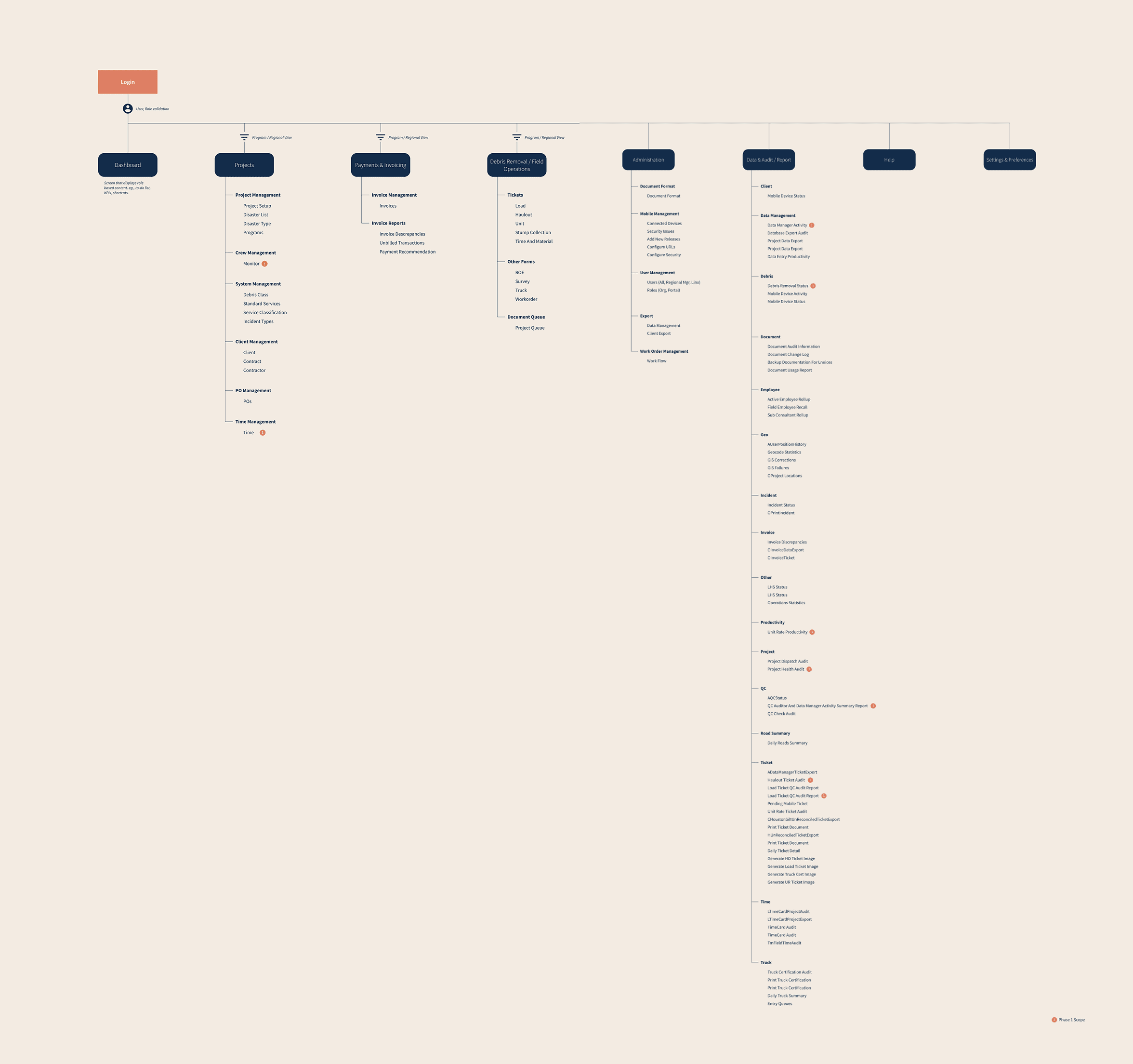
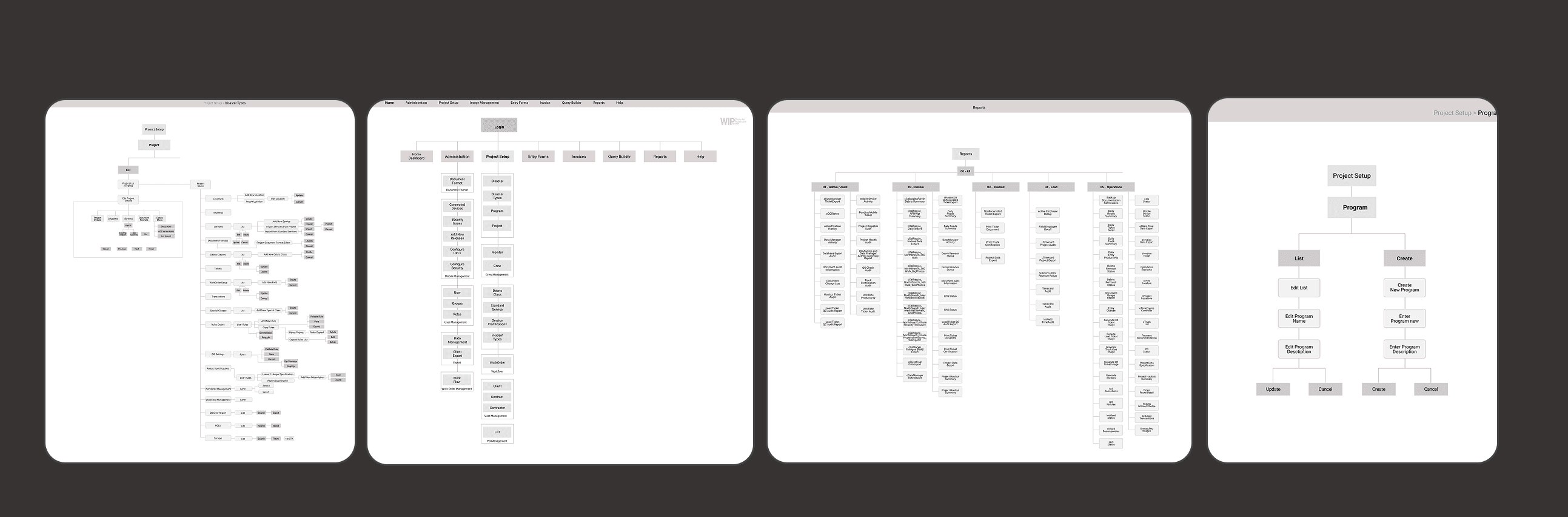
Below: information architecture exploration and user flows that informed navigation and discoverability.

Information architecture exploration for navigation and discoverability
Information architecture
User flows for key navigation paths
User flows

Despite having a large number of menus (even after elimination), the navigation that was finalised was kept straightforward and simple — the requirement was to keep the learning curve for users to a minimum.

This project operated within several challenges — rather than constraints — that shaped every design decision we made.

  • 01Limited access to direct end users due to operational and time constraints — we were designing for people in the field during active disaster response.
  • 02Existing backend systems and data structures that could not be changed — we designed around the data model, not the other way around.
  • 03A predefined design system that needed to be followed — visual design decisions were not ours to make freely.
  • 04Multiple user roles with different access levels and responsibilities — the same platform had to serve field workers and executives without confusion.
  • 05Mission-critical timelines — every screen needed to enable fast, confident decisions. There was no room for cognitive overhead.
Rationale
  • Field workers and executives have fundamentally different contexts, devices, and tasks. A single platform would compromise all of them.
  • The Disposal Monitor needed to work on mobile under harsh field conditions. Forcing this into a desktop portal would make it unusable.
  • Splitting by function allowed each product to be optimised for its specific user's workflow.
Impact
  • Role-appropriate interfaces reduced cognitive load across all 9 personas.
  • Mobile products could be designed for speed and single-handed use.
  • Desktop products could support the data density required by analysts and supervisors.
  • Data from all four products fed into a single reporting layer — one source of truth.
Rationale
  • Reports are typically the most mundane or most time-consuming task in a data-heavy enterprise product.
  • The client had very high expectations from the reporting section. Every required parameter needed to be upfront — not buried.
  • The ask was to surface every single required dataset within a couple of minutes of opening the report.
Impact
  • Dashboards structured so essential details are findable within minutes for quicker decisions.
  • Filters for major categories added to increase efficiency.
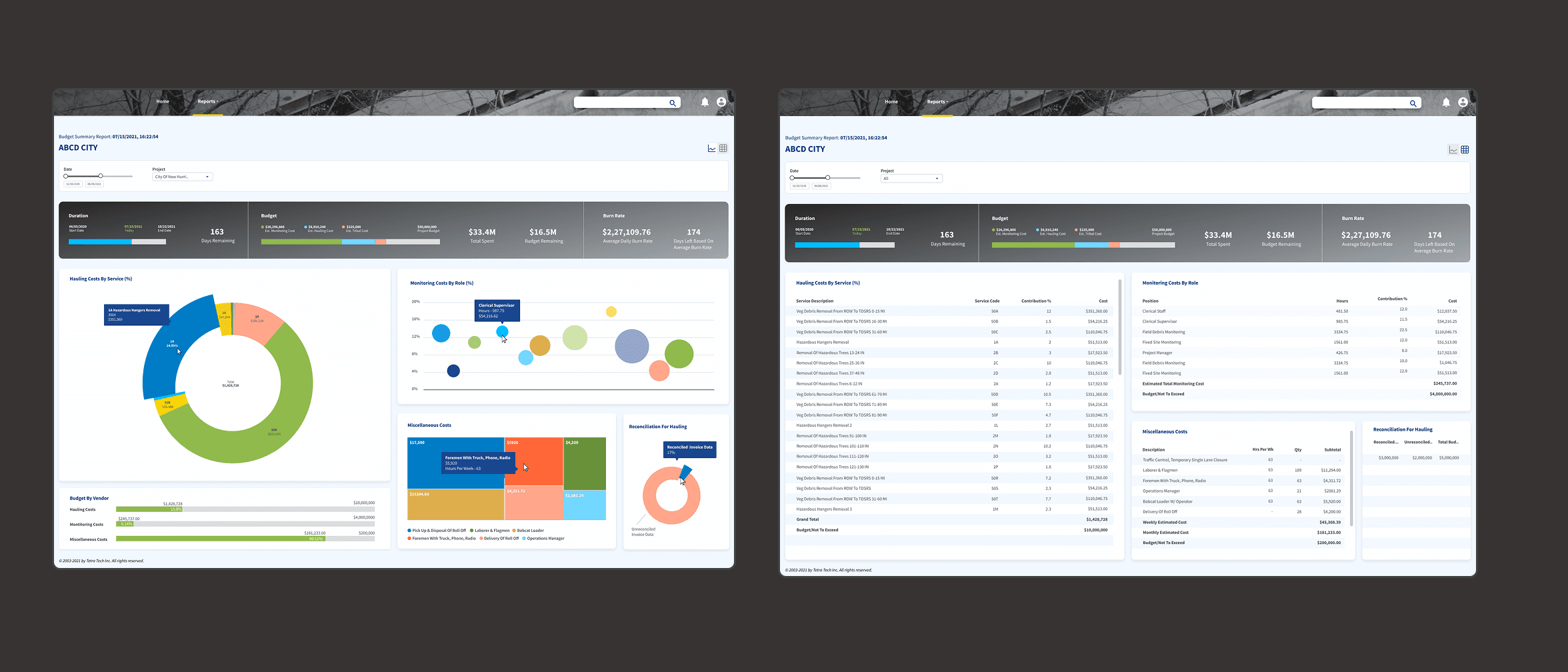
  • Four categories of reports designed: Haul Out, ROW Collection, Unit Rate, Budget Summary.
  • Dual-mode view — tabular and graph — catered to both analytical styles.
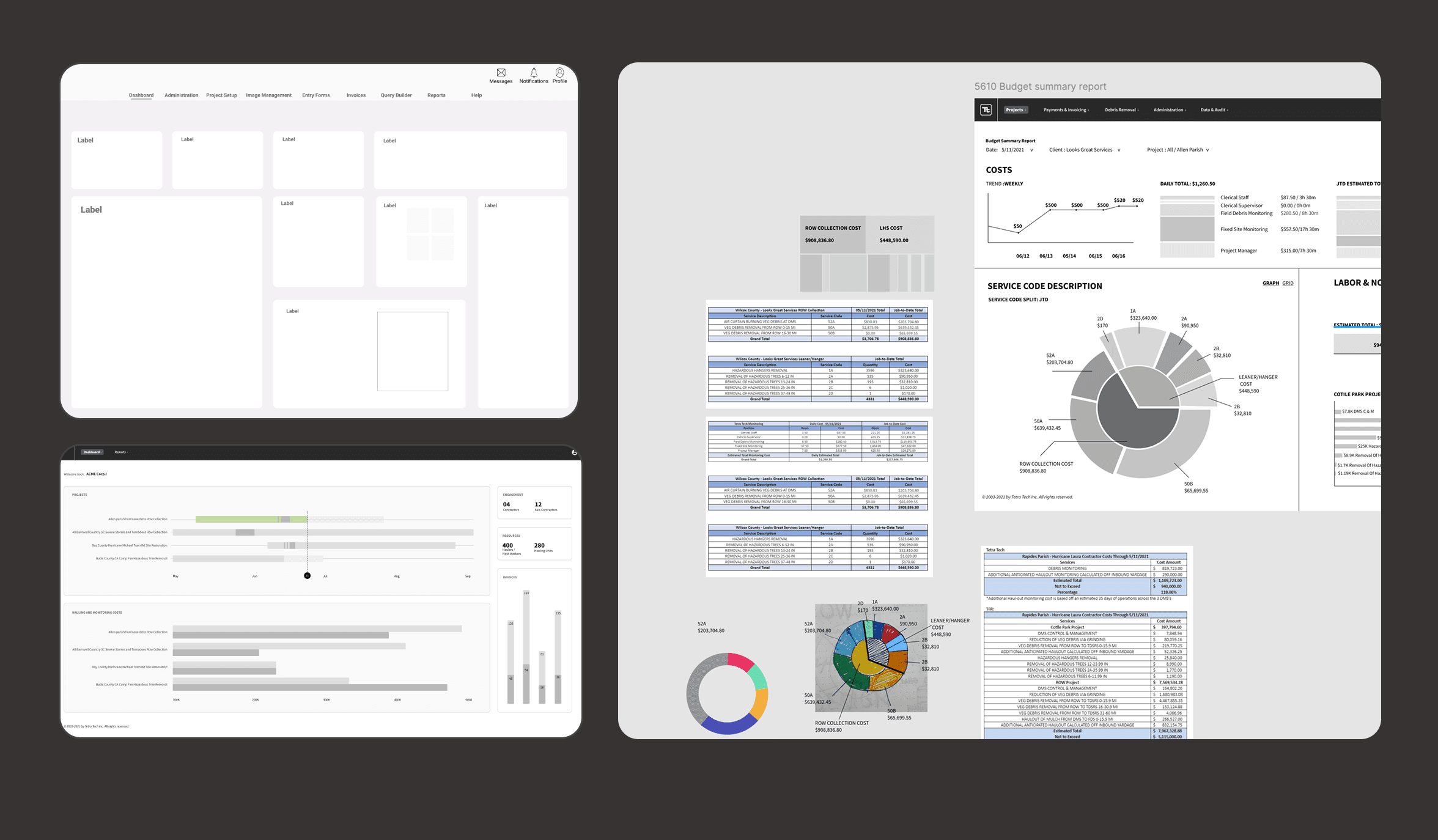
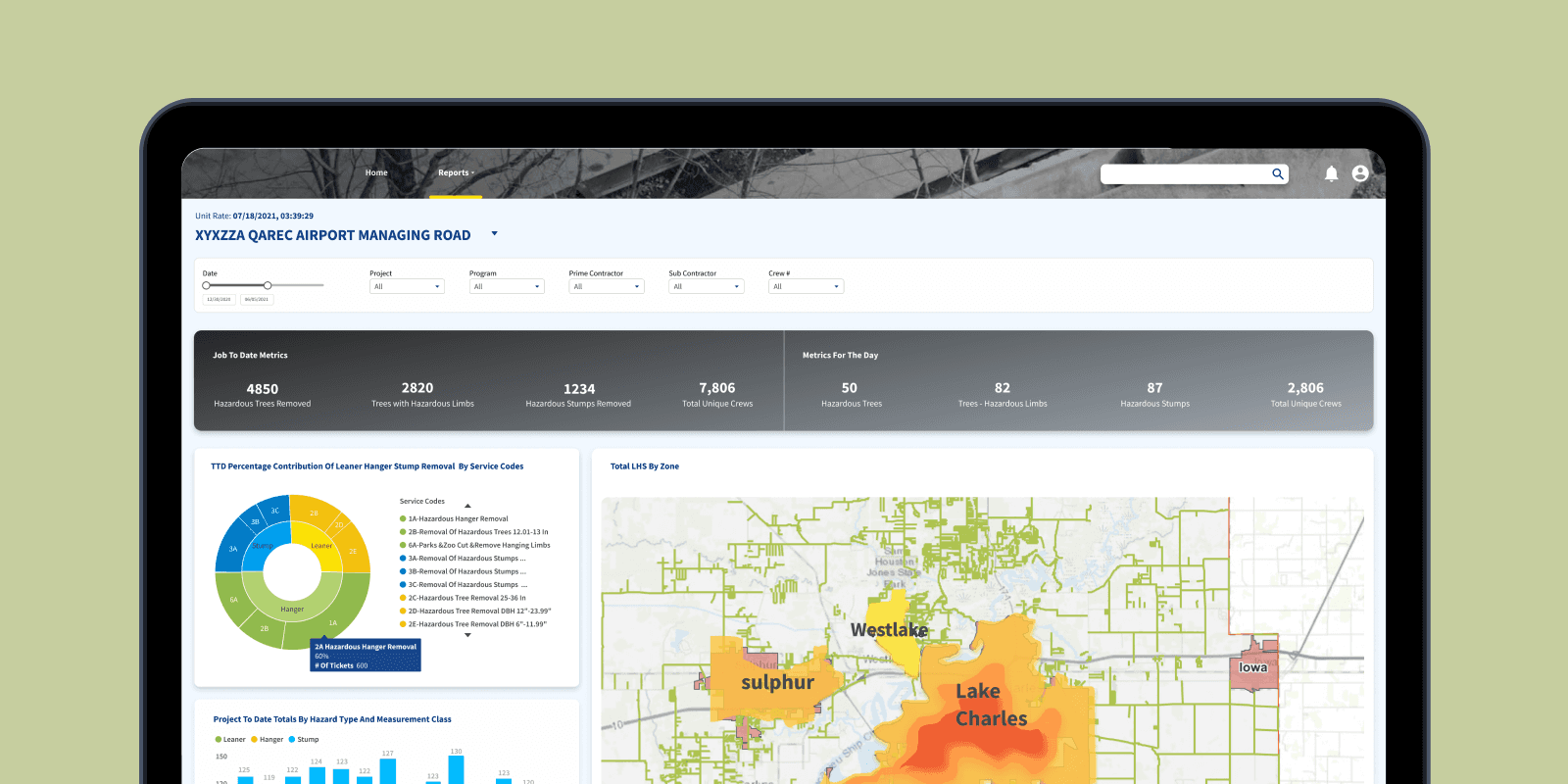
Reporting dashboards with key parameters surfaced upfront
Reports as a first-class priority, not an afterthought
Rationale
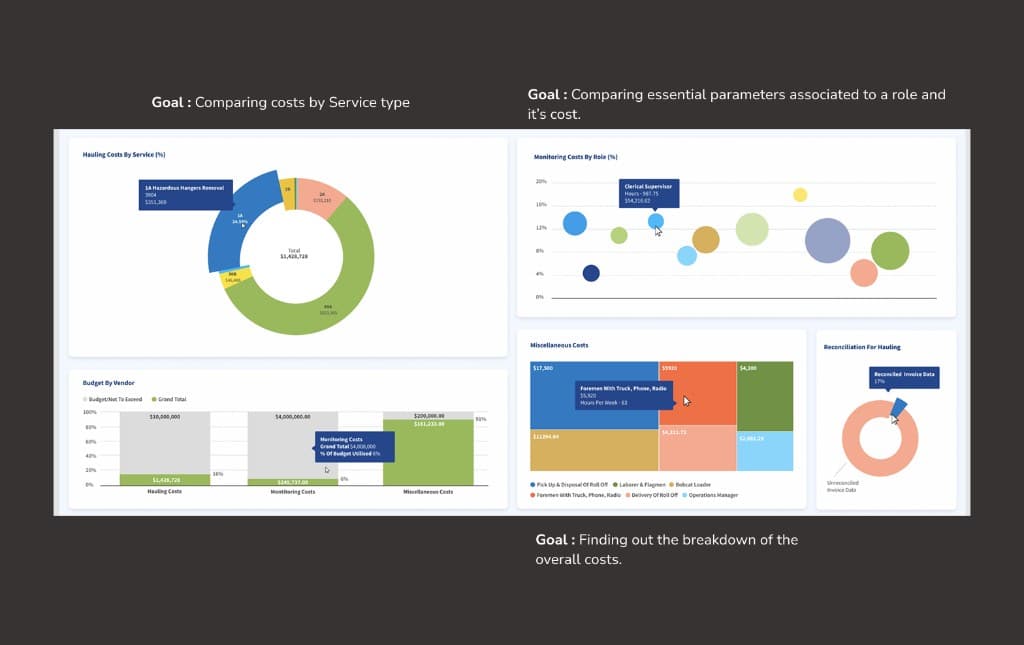
  • The biggest challenge was finding the appropriate data visualisation for each metric and fitting them within limited screen real estate.
  • Personas consumed data differently — some were graph-oriented, others needed tabular detail for audit trails and reconciliation.
  • It was challenging to think beyond regular visualisation types and even come up with nameless data visualisation combinations.
Impact
  • Same screen presented in both tabular and graph format — catering to both styles of information consumption.
  • Data depicted: categorisation of debris by type, site, weight/volume, and contractor.
  • Every data visualisation chosen on basis of requirement, colour distribution, and easy interpretation.
Dual-mode reporting: graph and tabular views of operational data
Dual-mode data visualisation — tabular and graph simultaneously
Rationale
  • We explored three navigation schemas: Mega Menu, Ribbon, and Panel. Each represented a different tradeoff between discoverability and simplicity.
  • Users were working on critical, time-bound tasks. Navigation had to be learnable in minutes, not hours.
  • Many pages and segments identified during IA work were redundant — elimination reduced navigation complexity significantly.
Impact
  • Final navigation pattern kept straightforward and simple despite the underlying complexity.
  • Learning curve minimised — a key client requirement for field workers who weren't power users.
  • Navigation exploration also identified redundant features that were eliminated before build.
Mega Menu
Ribbon
Panel
Rationale
  • Most real estate was content-heavy. The question was what grabs attention first, and what hierarchy of elements guides the user to a decision.
  • The visual design system was scalable and accessible by necessity — large number of users, mission-critical context.
  • We blocked out spaces to envision the best layout before committing to detailed design — exploring layouts as structure, not style.
Impact
  • Wireframing phase was critical — identified hierarchy issues before they became design debt.
  • Reports section designed so every required parameter is visible upfront — no buried data.
  • The design system (built by a separate team) was kept accessible and scalable throughout.
Content-heavy layout and information hierarchy in reporting views
Content-heavy layouts designed around information hierarchy, not aesthetics
Haul Out Reports

Volume and weight of debris hauled by site, day, and debris type

ROW Collection Reports

Right-of-way debris collection tracking by zone and contractor

Unit Rate Reports

Per-unit cost tracking and crew productivity metrics

Budget Summary Reports

Fund allocation, invoicing, and budget reconciliation overview

  • The centralised dashboard allowed crew captains and project managers to assess operational health quickly — reducing the need to navigate across multiple disconnected systems.
  • Role-based views and structured approval workflows helped maintain data integrity while supporting collaboration between field workers and backend office teams.
  • Clear traceability across debris collection, quality, and variance workflows improved confidence during reviews and audits.
  • Standardised inputs and structured data flows through the Disposal Monitor and Time App reduced inconsistencies in operational reporting.
  • The dual-mode visualisation approach (graph and tabular) meant that different user types — from field supervisors to invoice reconcilers — could consume the same data in their preferred format.
Disaster recovery platform — outcome and reporting visibility
Outcome — centralised dashboard and reporting

This project involved designing within real operational and system constraints. Limited access to end users and fixed backend structures required decisions to be made based on system understanding, stakeholder input, and observed workflow patterns rather than ideal processes. The reporting segment was where I contributed most — and where I learnt the most. It was challenging to think beyond regular visualisation types, to find the most appropriate chart for every metric, and to fit them meaningfully within the limited screen real estate of a dashboard that had to surface everything upfront. What this project taught me most was the relationship between data density and decision speed. When data is scattered across tools, people don't just lose time — they lose trust. The design problem was never really the interface. It was the absence of a single source of truth that everyone could act on.

Our aim was to supercharge the client's response time and efficiency. Three years later, I think we did.